In the modern digital world where multitasking, gaming, programming, video editing, and content creation have become more intensive than ever before, screen real estate truly matters. Among all brands that manufacture displays, LG Ultrawide monitors stand out as one of the most powerful, stylish, and productivity-boosting display solutions. From office setups to gaming battlestations and editing studios, Ultrawide displays are everywhere — and for a good reason.
What is an LG Ultrawide Monitor?
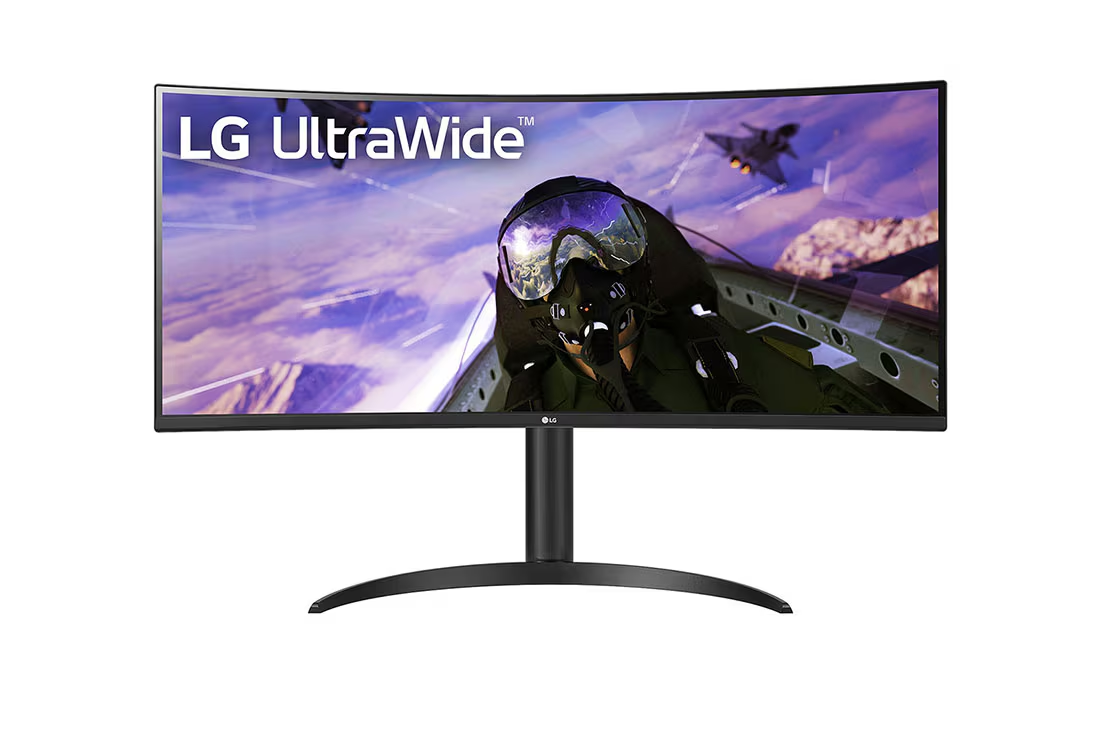
An Ultrawide monitor is a display with a 21:9 or wider aspect ratio, compared to the standard 16:9 screens. This means more horizontal screen space, giving users a panoramic view. LG is a leading name in this space, producing models ranging from budget-friendly to high-end premium professional displays.
In simple terms:
An LG Ultrawide monitor is a widescreen display built for multitasking, immersive gaming, cinematic viewing, and professional workflow enhancement.
Why Choose LG Ultrawide Over Regular Monitors?
Unlike regular monitors that limit workspace, ultrawide screens open up multiple windows side by side, increasing workflow efficiency and reducing the need for dual-monitor setups.
Top reasons users love LG Ultrawide:
- Extra space for multitasking without clutter
- Perfect for editing timelines in Premiere, DaVinci, or Final Cut
- More immersive gaming experience with wider FOV
- Better movie watching experience (cinematic aspect ratio)
- Cleaner desk setup vs using two screens
If you want one screen to replace two, Ultrawide is the answer.
Types of LG Ultrawide Monitors
LG offers multiple ultrawide options depending on use case:
- LG Ultrawide (Standard Productivity Models)
- LG UltraGear (Gaming-focused models)
- LG UltraFine (High-end professional color-accurate monitors)
- Curved Ultrawide Monitors
- Flat Ultrawide Monitors
Different needs, different models, one brand — LG covers them all.
LG Ultrawide Features That Stand Out
Let’s break down the core features that make Ultrawide special.
1. Ultrawide Aspect Ratio
Much wider view compared to traditional monitors.
2. IPS Technology
Better color accuracy, wide viewing angles.
3. High Refresh Rates
Great for gaming — available in 75Hz, 144Hz, 160Hz, and even higher on select models.
4. HDR Support
Brighter highlights and deeper blacks.
5. USB-C Connectivity
Charge your laptop + transfer video with one cable.
6. OnScreen Control Software
Split screen and layout management becomes effortless.
Productivity Boost With LG Ultrawide
Whether you are a developer, trader, editor, or content creator, an ultrawide screen changes workflow dramatically.
Multitasking is easier because:
- 3–4 windows open without switching tabs
- Drag and snap features simplify layout
- Email + work + media can all run side by side
Use-case examples:
- Video Editors: Longer timeline view = faster edits
- Developers: Code + documentation + terminal in one frame
- Traders: Track multiple charts simultaneously
- Writers/Bloggers: Research and write on same screen
No more window jumping — just smooth productivity.
Gaming on LG Ultrawide – An Immersive Experience
Gamers love ultrawide monitors. Why?
- Wider field of view gives better situational awareness
- More immersive visuals in open-world games
- Perfect for racing, flight simulators & action titles
Many LG models feature:
- AMD FreeSync / NVIDIA G-Sync compatibility
- Low input lag
- High refresh rates
Games feel more natural and cinematic.
Curved vs Flat LG Ultrawide – Which to Choose?
Both outputs serve differently.
Curved:
- More immersive gaming
- Surround vision feeling
- Comfortable viewing across edges
Flat:
- Ideal for productivity/work
- Cleaner gridline layout for designing
- Great for wall-mounted setups
Choose depending on your primary usage.
LG Ultrawide for Content Creation
Creators need accurate colors and expanded canvas. LG provides:
- 99% sRGB / DCI-P3 wide color gamut
- IPS panels for accurate tones
- True-to-life calibration support
- Sharp resolution options like 1440p & 4K ultrawide
Perfect for:
- YouTubers
- Photo editors
- Animators
- Digital artists
- Filmmakers
More space = more creativity room.
Popular LG Ultrawide Models Worth Checking
Here are some widely appreciated LG Ultrawide models:
1. LG 34WN80C
- USB-C
- 34-inch curved IPS
- Ideal for productivity
2. LG 38WN95C-W
- 38-inch
- Nano IPS
- 144Hz refresh rate
- High-end professional + gaming hybrid
3. LG UltraGear 34GP83A-B
- Gaming focused
- 144Hz G-Sync compatibility
4. LG 29WN600
- Budget-friendly
- 29-inch IPS, HDR10
- Great entry ultrawide
5. LG UltraFine 40WP95C
- Premium 5K ultrawide
- For top-tier creative professionals
These models dominate popularity charts.
Pros and Cons of LG Ultrawide Monitors
Pros:
- Massive workspace area
- Perfect for multitasking
- Great gaming visuals
- Color accurate for creative work
- Eliminates dual monitor bezels
- Sleek and modern look
Cons:
- Requires wider desk space
- High-end models can be expensive
- Some games lack native 21:9 support
- Higher GPU demand for ultrawide gaming
Still, for most, pros strongly outweigh cons.
Who Should Buy an LG Ultrawide?
You should consider one if you are:
✔ Gamer
✔ Programmer
✔ Editor/Designer
✔ Financial Analyst
✔ Multitasker
✔ Office Professional
✔ Home Studio User
Basically — anyone who values screen space will benefit.
Things to Consider Before Buying LG Ultrawide
Important Checklist:
- Size preference (29″, 34″, 38″, 40″+)
- Flat vs Curved display
- Refresh rate needs (work vs gaming)
- USB-C vs HDMI
- Color accuracy for creative work
- Desk space and mounting stand
Buying becomes easier when these factors are clear.
LG Ultrawide vs Dual Monitor Setup
Many shoppers ask — “Should I buy one ultrawide or two monitors?”
LG Ultrawide Benefits Over Dual Monitor:
- No bezel gap in between
- Cleaner setup aesthetics
- Less cable clutter
- Better multitasking experience
When dual monitor might still be better:
- Extremely specialized workflow
- Need to rotate one monitor vertically
Most users find ultrawide a superior upgrade.
User Reviews and Real-World Feedback
Most users highlight:
- Smooth multitasking experience
- Beautiful color and brightness levels
- Significant workflow improvement
- Gaming feels more engaging
- Minimal eye strain even after long usage
Negative feedback mainly revolves around price of higher models and desk fitment. However overall sentiment remains highly positive.
Why LG Ultrawide Content Ranks Well for SEO
Topics related to display setups are widely searched. “Ultrawide monitor” has strong keyword volume, and LG is a recognized brand, making this article niche-friendly yet trending.
This keyword is perfect for:
- Tech blogs
- Setup inspiration websites
- Productivity and workflow blogs
- Gaming websites
- Affiliate article marketing
Search potential is high and evergreen.
Frequently Asked Questions About LG Ultrawide
Q1: Are Ultrawide monitors worth it?
Absolutely — especially for multitaskers, gamers, and creatives.
Q2: Is 34-inch ultrawide too big?
No, it’s a popular and comfortable size for most desks.
Q3: Do all Ultrawide models support USB-C?
Not all. Check model specifications before purchasing.
Q4: Is ultrawide good for gaming?
Yes, especially games that support 21:9 or 32:9 aspect ratios.
Q5: Which is better — Curved or Flat?
Curved for immersion, flat for productivity. Depends on usage.
Conclusion – LG Ultrawide is More Than a Monitor; It’s a Workspace Upgrade
If productivity, comfort, immersion, and aesthetics matter to you, then Ultrawide monitors are one of the best upgrades you can make to your desk setup. They offer excellent color quality, large working space, powerful gaming capability, and a beautiful panoramic display that enhances both work and entertainment.
From entry-level 29-inch models to massive 40-inch 5K ultrawide beasts, LG ensures there is an option for every budget and need. Whether you’re editing videos, coding software, trading markets, watching movies, or gaming till late night — the Ultrawide experience truly elevates your workflow and lifestyle.
For creators, gamers, office workers, or anyone who wants to replace multiple screens with one seamless display — LG Ultrawide is worth the investment.